Spades
- 4.7
- Rating
- 100.00K
- Installs
- Free
- Price

 Analysis by App-foxy
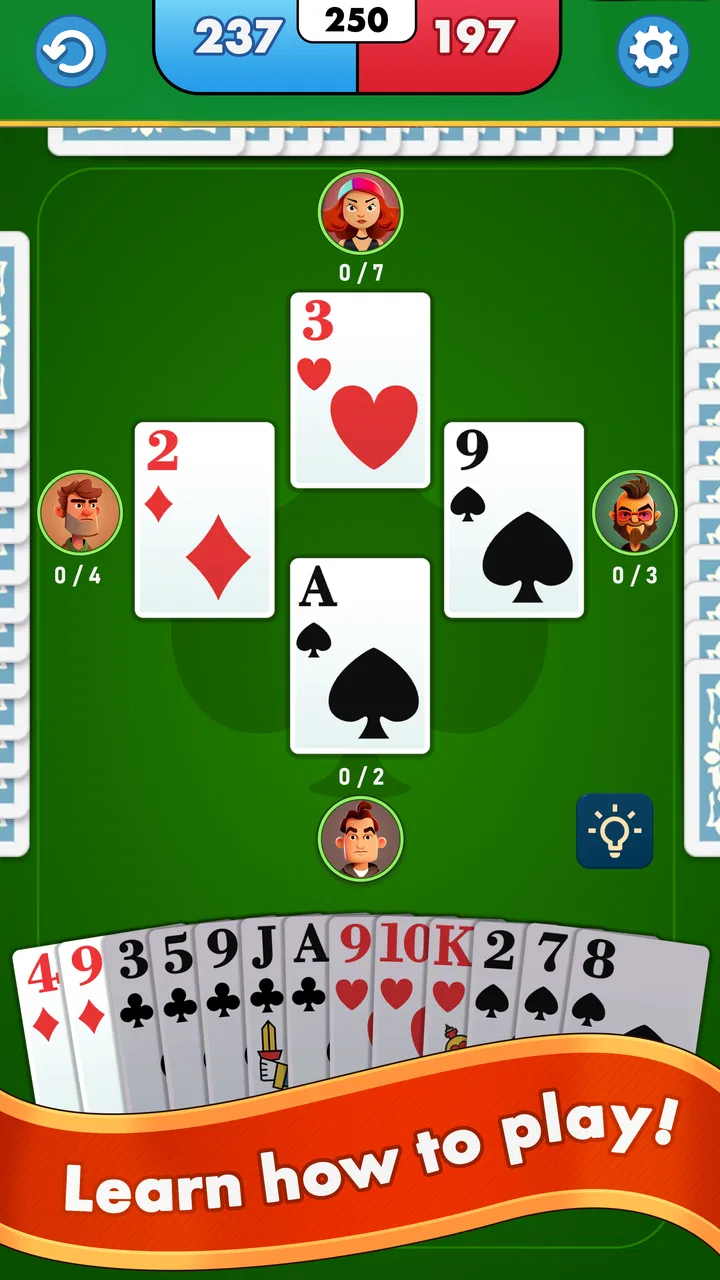
I enjoy card games most when they are easy to start but still give me a reason to think before every move. Spades fits that space well. It is a free card game from YouXi Games built around the familiar Spades format, and my first impression is that it works best as a quick, focused way to fill a quiet break rather than as a large, feature-heavy gaming destination. The appeal is immediate: you can sit down with a standard trick-taking game, concentrate on bidding and card management, and stop whenever the session no longer suits you.
That simplicity is also where the experience can be misunderstood. A short store summary tells you what the game is, but not how to approach it, what to check before playing, or what to do when a session does not behave as expected. I found that the most useful way to judge it is not by asking whether it replaces every other card game, but whether it gives a dependable, comfortable Spades routine on an Android device. For the right player, the answer is yes, with a few practical qualifications.
Getting comfortable with the game before the first hand
Spades is a partnership trick-taking game, so the main challenge is not simply playing the highest card. You first estimate how many tricks you can win, then try to reach that target while reading the cards already played and guessing what your partner and opponents may still hold. Spades are normally the trump suit, which means a carefully saved spade can change the result of a trick later. That basic structure gives the game more depth than a casual matching game, even though the individual turns are easy to understand.
You May Also Like

 Blood Strike: 2.5 Anniversary
Blood Strike’s Loadouts Turn Every Drop Into a Tactical Gamble
A close look at Blood Strike’s custom loadouts: how fast access to signature weapons reshapes its battle royale rhythm, rewards preparation, and narrows the gap between fights.

 Pandora - Music & Podcasts
Pandora’s Music Is Easy to Start, but Harder to Recover
Pandora’s strength is its low-effort path from a seed to a station. Its weak spot is how much confidence it asks you to place in connection, setup, and quiet recovery.

 8 Ball Pool
8 Ball Pool Is Built on Rivalries, Rematches, and Routine
A close look at the rivalries, rematches, shared routines, and unanswered safety questions that turn a quick pool match into a persistent mobile community.

 Samsung Music
Samsung Music’s Quiet Strength Is Playing What You Already Own
Its reach comes less from spectacle than from dependable access to a personal library. That simplicity is both the app’s strongest retention engine and its ceiling.

 AccuWeather: Weather Radar
AccuWeather Review: A Quick, Clear Forecast for Everyday Decisions
For everyday plans, the best forecast is the one you can understand quickly. AccuWeather makes rain timing, radar, and local conditions easy to act on, with a few trade-offs.

 Hill Climb Racing
Why Hill Climb Racing Still Turns Crashes Into One More Run
A tiny car, a bumpy hill and one more upgrade: Hill Climb Racing keeps resurfacing because its simple chaos makes every near-miss feel personal.
More From Our News Desk



I would recommend it to someone who likes traditional card games but does not want a complicated campaign, a long tutorial path, or a large collection of unrelated modes. It is also a sensible choice for people who already know Spades and want a straightforward mobile version. The game is rated for Everyone, runs on devices using Android 6.0 or later, and is free to install. That makes it approachable for a broad range of players, including someone using an older phone that may not handle newer, graphically demanding games comfortably.
The current release is version 0.0.89, and the app has built a visible audience, with an average rating of 4.7 from around 7.6 thousand ratings and more than 100 thousand installs. Those figures suggest that the basic idea is connecting with players, although popularity alone does not tell me whether it will match your preferred pace or presentation. I still pay more attention to how quickly I can begin a hand, how clearly I can follow the table, and whether the game stays pleasant after several rounds.
Where players are most likely to get stuck
The first sticking point is usually not the rules themselves but the transition from opening the game to understanding the current hand. Spades rewards attention to the bidding stage, and a player who treats the bid as a rough guess can make the rest of the round feel unfair. My practical advice is to count your likely winners before selecting a bid. High cards in several suits may be useful, but they do not automatically guarantee tricks if opponents can force you to follow suit or if your winning cards are poorly timed.
A second point of friction is the difference between winning a trick and winning the whole hand. It can feel good to take an early trick with a strong card, yet that may remove an important card you needed later. I found it more useful to think in terms of the target established during bidding. If I have already secured enough tricks, I avoid spending a valuable spade simply to win another one. If I am behind the target, I look for a controlled opportunity rather than reacting to every card on the table.
New players can also misread a quiet early round. A low card may be valuable because it lets you lose safely and preserve stronger cards for later. Likewise, a high card in a suit that opponents can no longer follow may become a liability if it forces you to take a trick you did not want. These are not flashy features, but they are the decisions that make the game worth returning to. The app is at its best when you treat each hand as a small planning exercise rather than a sequence of isolated taps.
Simple setup checks that prevent avoidable frustration
Before blaming the game for a problem, I would begin with the basics. Confirm that the device meets the Android requirement, make sure the app has finished installing, and reopen it after an update if the first launch feels unusual. Version 0.0.89 is the release I reviewed, so seeing a different version later may mean that the layout or behavior has changed slightly. That is normal for a developing game and is a good reason to check the version shown on your device before comparing your experience with someone else’s.
It is also worth starting with a short session rather than immediately committing to a long run. Play through the opening screens, begin a hand, and check whether the cards are easy for you to distinguish on your display. A smaller phone, a bright environment, or a display with reduced contrast can make card suits harder to read than expected. If a card looks unclear, changing the phone’s brightness or viewing angle may help more than reinstalling the game.
Because the game is free, the initial decision is relatively low-risk. However, in-app purchases range from $1.99 to $9.99 per item, so I would avoid tapping purchase options casually while learning the interface. A useful habit is to finish a few sessions first and decide whether the free experience already gives you what you want. If the game is only going to be used for occasional breaks, spending money may not improve the part you actually enjoy, which is the card play itself.
Another sensible check is your playing environment. If the game appears slow or a session does not progress, close other demanding apps and relaunch it. This is especially relevant on an older device that meets the minimum operating-system requirement but has limited spare memory or battery. Meeting the minimum OS requirement means the app can run on that software level; it does not guarantee identical smoothness on every phone. I would treat that distinction as practical rather than alarming.
Recovering a session without losing your rhythm
When a hand seems to stop responding, my first recovery step is patience. A brief pause can be mistaken for a failed turn, and tapping repeatedly may create confusion if the game catches up. I wait, check whether the table has changed, and then try one deliberate action. If nothing moves, I leave the session and reopen the game rather than continuing to press the same area of the screen.
If the problem remains, I use a simple sequence: close the app completely, reopen it, and test a fresh hand. This separates a one-off session issue from a broader installation or device issue. I would not immediately clear app data, because that can remove local progress or settings depending on how the game handles them. A restart is the safer first move, especially when the goal is simply to return to a card table quickly.
It helps to remember the exact point at which the trouble appeared. Did it happen during bidding, after a card was played, or while moving between screens? That detail gives you a better way to judge whether the issue is connected to a particular action or was just a temporary interruption. I also avoid switching rapidly between the game and other apps during an active hand. On a phone under pressure, that habit can make a normal resume feel like a game error.
For a more reliable routine, I suggest playing one hand after reopening before deciding whether the problem is solved. A single successful launch does not prove that every session will be perfect, but it tells you whether the basic recovery worked. If the same interruption appears repeatedly at the same stage, record the version shown in the app and the device’s Android version before seeking help. That is more useful than a general complaint that the game “does not work.”
When the game is not really the cause
Not every disappointing session is caused by the application. Card games can expose weaknesses in attention, expectations, and device conditions. If the cards seem difficult to follow, the issue may be screen glare or text scaling rather than the deck itself. If the game feels slow only when many other apps are open, available system resources are a more likely explanation than the rules or the developer.
Network conditions can also affect any part of a mobile experience that needs a connection, but I would avoid assuming that every pause is a network failure. First check whether the whole phone is struggling or whether only this game is affected. Try a fresh session, compare performance in another app, and notice whether the issue occurs consistently. This kind of basic comparison prevents unnecessary reinstallations and makes it easier to identify a device, connection, or temporary service problem.
There is another kind of mismatch that is not a technical fault: expecting a particular style of Spades. Some players want a large online community, extensive customization, voice communication, tournaments, or a broad selection of card games in one app. Spades is not the choice I would make for that purpose. Its strength is concentration on the classic game, so a more expansive card-game platform may be better if variety and social features matter more to you than a clean Spades session.
I would also skip it if you dislike trick-taking games or find bidding stressful. The app cannot remove the central tension of deciding how many tricks you can realistically win. Someone looking for a relaxed game with almost no planning may be happier with solitaire or a simple matching title. By contrast, players who enjoy learning from mistakes will find more to examine here: whether the bid was too ambitious, whether a spade was used too early, and whether a losing trick was actually useful.
Small habits that make each hand more rewarding
My favorite improvement is to separate counting from emotion. After the bid, I keep the target in mind and count confirmed tricks instead of judging the hand by whether I won the last play. This prevents one bad-looking trick from causing a rushed decision. It also makes the game more approachable for beginners because the goal becomes a series of manageable checks rather than an attempt to predict every card.
A second habit is to watch which suits disappear from play. If a player cannot follow a suit, that player may later be able to use a spade when the suit is led again. I do not need to remember every card; I only note the important changes in what opponents can follow. That information helps me decide when leading a suit is safe and when it may give someone an easy chance to trump.
A third useful trade-off concerns risk. When I have a strong hand, it is tempting to bid aggressively, but a conservative bid can be the better choice if the cards are uneven or if winning extra tricks could create unwanted penalties in the scoring system used by the game. I approach each hand according to the cards in front of me rather than trying to prove that I can win. That mindset makes the experience less frustrating and gives me a clearer reason for every play.
For an everyday scenario, imagine having ten minutes before an appointment. I would open the game, play a short stretch, and use the time to practice reading the table rather than chase a perfect result. If I had longer, I might review the previous hand mentally: did I overbid, waste a trump, or fail to notice that a suit was already exhausted? This makes the app useful as a compact concentration activity, not just background entertainment.
How it compares with familiar alternatives
Compared with solitaire, Spades gives me more interaction and more decisions, but it also asks for more attention. Solitaire is easier to pause mentally because the outcome depends mostly on the arrangement of the cards and my available moves. Spades feels more social in structure even when I am playing through a digital table, since I must account for a partner and opponents rather than only my own options.
Compared with a broad card-game collection, this game is more focused. That is an advantage when I want Spades specifically and do not want to navigate through poker, hearts, rummy, or casino-style distractions. The trade-off is obvious: if I want to switch between several games in one sitting, another app may offer better value. I would choose this one for a dedicated Spades habit, not for a complete card-game library.
It also differs from a heavily social or competitive platform. Players who care about visible rankings, live opponents, chat, or organized events should investigate alternatives designed around those priorities. I prefer this game when I want the rules and decisions to remain central. Its focused nature makes it easier to pick up for a quiet break, but it may feel limited to someone who measures a card app by its community features.
Who should install it, and who should wait
I think Spades is a good fit for beginners who want to learn the classic trick-taking structure without paying at the start, as well as experienced players who want a familiar game on a compatible Android phone. The age rating of Everyone makes it suitable for a broad audience, and the free entry point means you can test the pace before deciding whether it belongs in your regular rotation.
I would be more cautious if your phone is close to the minimum software requirement and already struggles with ordinary apps. The game may still run, but the overall experience depends on the device’s condition, not only on compatibility. I would also look elsewhere if you need iOS support, a large multiplayer community, several card games in one package, or a strongly customized presentation. Those are reasonable preferences, but they point toward a different kind of app.
The developer, YouXi Games, has kept the concept clear enough that I can understand the product immediately: this is a dedicated Spades game rather than a general entertainment hub. That clarity is valuable, although it also means the app has less room to surprise me with unrelated content. For me, the decision comes down to whether I want a focused card table or a broader collection of features.
After using it, I see Spades as a practical free option for short, thoughtful sessions. It is not the right answer for every card-game player, and setup or session interruptions may require ordinary checks before you assume the app is broken. Still, once the device and display are behaving normally, the core experience gives me what I want: a familiar game, enough strategic tension to reward careful play, and a low barrier to trying it.
My practical verdict is simple: choose Spades if you want focused trick-taking practice without unnecessary complexity. Start with a few hands, bid conservatively while learning, use deliberate recovery steps if a session pauses, and judge it by the quality of the card play rather than by expectations borrowed from larger gaming platforms. With that approach, it is an easy recommendation for a quiet break and a reasonable introduction to the genre.
FAQs for Spades
01What is the main objective of the Spades game app?
The main objective of the Spades game app is to provide an engaging digital version of the classic card game. Players aim to win tricks by playing the highest card in the suit led or by playing a spade, which is a trump card. The goal is to accurately bid on the number of tricks you think you can win and then achieve that bid.
02Is the Spades app free to download and play?
Yes, the Spades app is typically free to download and play. However, it may offer in-app purchases or ads to enhance the gaming experience, remove ads, or buy additional features like extra themes or avatars. Always check the app store for specific details about any potential costs.
03Can I play the Spades app offline or with friends?
The Spades app often includes both offline and online modes. You can play against AI opponents when offline or join multiplayer games to compete with friends or other players worldwide. Some versions might even allow creating private rooms for a more personalized experience with friends.
04Is the Spades app suitable for beginners?
Yes, the Spades app is generally suitable for beginners. Many versions include tutorials or beginner-friendly modes that explain the rules and strategies of the game. This makes it easy for new players to learn how to play and improve their skills before competing in more advanced games.
05What are the device requirements for installing the Spades app?
The device requirements for the Spades app vary based on the version and platform. Typically, it requires a smartphone or tablet with a recent version of Android or iOS. Make sure your device has sufficient storage space and is connected to the internet for optimal performance when downloading and playing the app.
Pros
- Intuitive interface enhances gameplay.
- Supports multiplayer with friends easily.
- Offers a variety of game modes.
- Minimal ads for a smooth experience.
- Customizable avatars for personalization.
Cons
- Occasional connectivity issues.
- In-app purchases can be pricey.
- Limited offline functionality.
- Graphics could be more modern.
- Notifications can be intrusive.

Spades
Gallery